

Free to start — on iPhone, Android and the web
Do your pension forms faster in the app
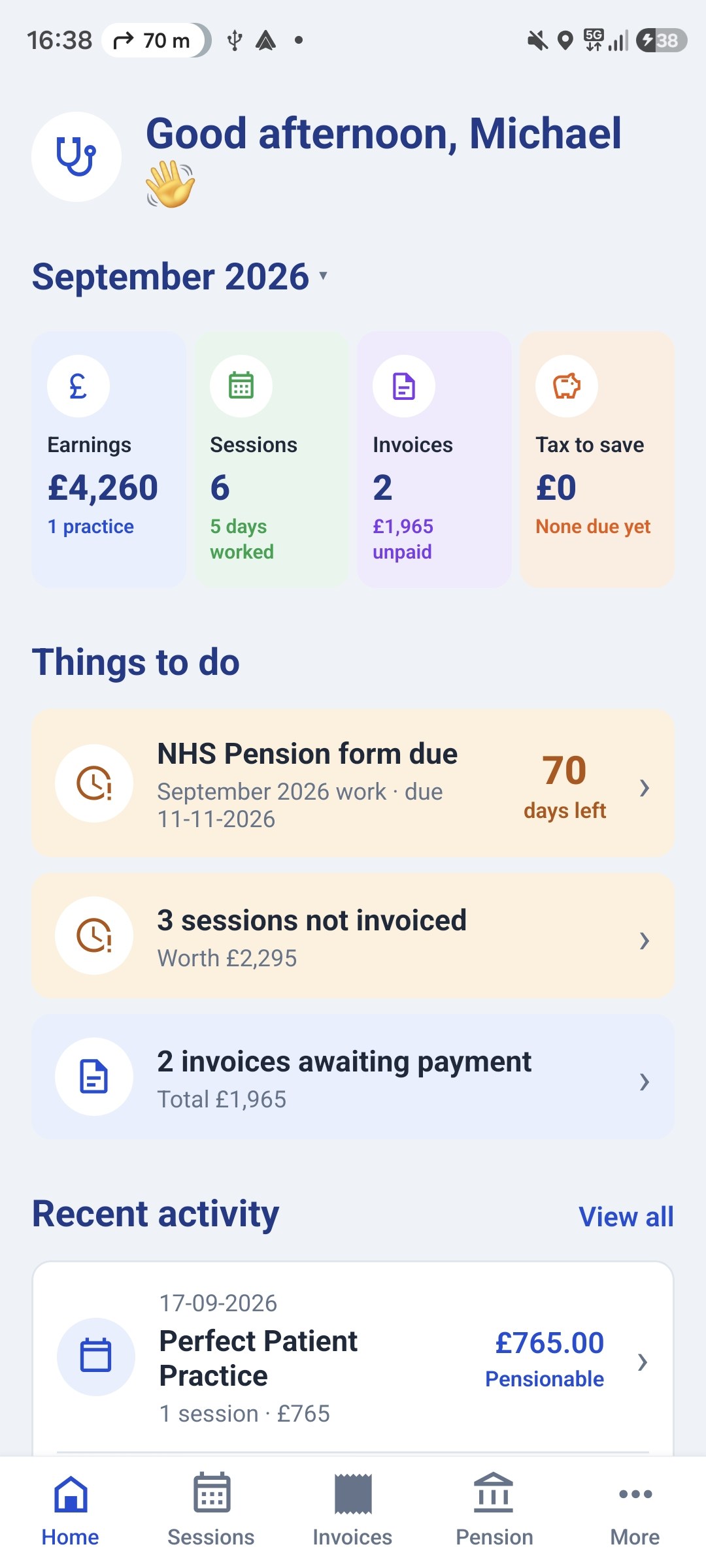
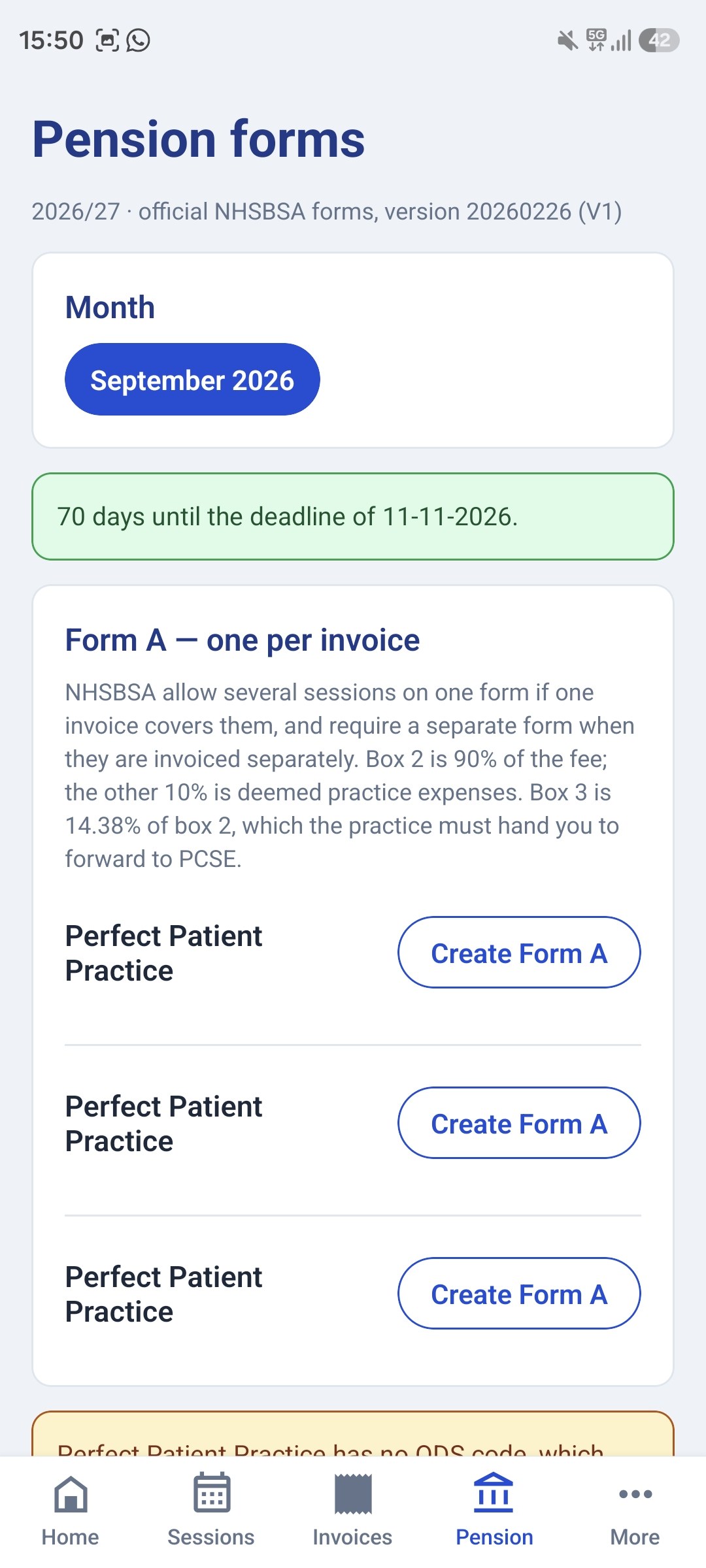
Your sessions flow straight into Form A and Form B, with the 90% pensionable pay and the employer contribution worked out for you, and the ten-week deadline counting down on the home screen.
On the App Store for iPhone, Google Play for Android, and at gplocumapp.co.uk on any computer. Sign in on both and they stay in step.


GP Locum Form A & Form B Filler
Fill the official NHS Pensions locum forms for 2026/27, a Form A for each invoice, then the Form B that adds up the month. The 90%, the 14.38% and every total are worked out for you, and the PDFs you download are NHSBSA's own forms, filled in.
Your details
Saved in this browser, and shared with the invoice generator.
As it should appear on the invoice and the forms.
Form B asks for surname and forenames separately.
Eight digits. It starts the payment reference on Form B.
Only if you started using this tool part-way through the year. It's added to box j so your cumulative figure stays right.
Yours, not the practice's. It's usually just the area you work in, such as “Northwest”, or the longer form like “NHS England North (Lancashire and Greater Manchester)”. It's on your previous forms, or you can look yours up on the PCSE Performers List.
Practices
Where you worked, and their codes.
Work to pension
One row per period of work. Sessions raised in the invoice generator appear here automatically.
Nothing recorded for October 2026 yet.
Form A, October 2026
One form per invoice. Send it to the practice with the invoice; they complete Part 2 and sign.
No pensionable work recorded for this month yet.
Form B, October 2026
One line per Form A, and the totals that go to PCSE with your payment.
Form B covers fees you were paid in the month. Fill in a payment date above and the lines will appear here.
The blank forms are NHSBSA's own (20260226 (V1)), published under the Open Government Licence and filled in your browser. Check the figures before you send anything. You are the one signing it.
What to look at next
- Locum GP Pension GuideForms A and B, the 90% rule, the 10-week deadline, and the annualisation traps that cost locums pension.
- Locum Invoice Template and GeneratorA free GP locum invoice template. Build and download a professional PDF invoice for a practice, with your bank details, session rates, and the optional NHS pension employer contribution line.
- Locum Tax CalculatorWork out what to set aside from your locum fees for tax and National Insurance.
This tool fills the official forms from the figures you enter. It doesn't check them against your NHS pension record, and it isn't tax or financial advice.
Free to start — on iPhone, Android and the web
Fill these from your phone instead?
GP Locum logs each session as you book it, then fills your Form A and Form B from the sessions themselves and raises the invoices. On your phone and on the website, kept in step.
What this tool does
It fills in NHS Pensions Form A and Form B for you and hands back NHSBSA’s own PDFs, completed. You enter the fee and the dates you worked; it works out every box, totals the month, tells you what to pay PCSE and what reference to pay it with, and counts down the 70-day deadline before the work stops being pensionable altogether.
It shares a workspace with the invoice generator, because invoicing a session and pensioning it are two halves of one job. Re-typing the practice, the dates and the fee at the second step is exactly where the mistakes happen. Everything stays in your browser.
How the two forms fit together
Form A is per invoice. One for every fee you are paid, signed by the practice:
- Box 1. Your fee, excluding any employer contribution.
- Box 2. Pensionable pay, which is 90% of box 1. The remaining 10% is deemed practice expenses. This is fixed by regulation; you cannot choose to pension more or less.
- Box 3. The employer contribution, 14.38% of box 2, including the 0.08% administration levy. The practice pays this to you, and you forward it to PCSE.
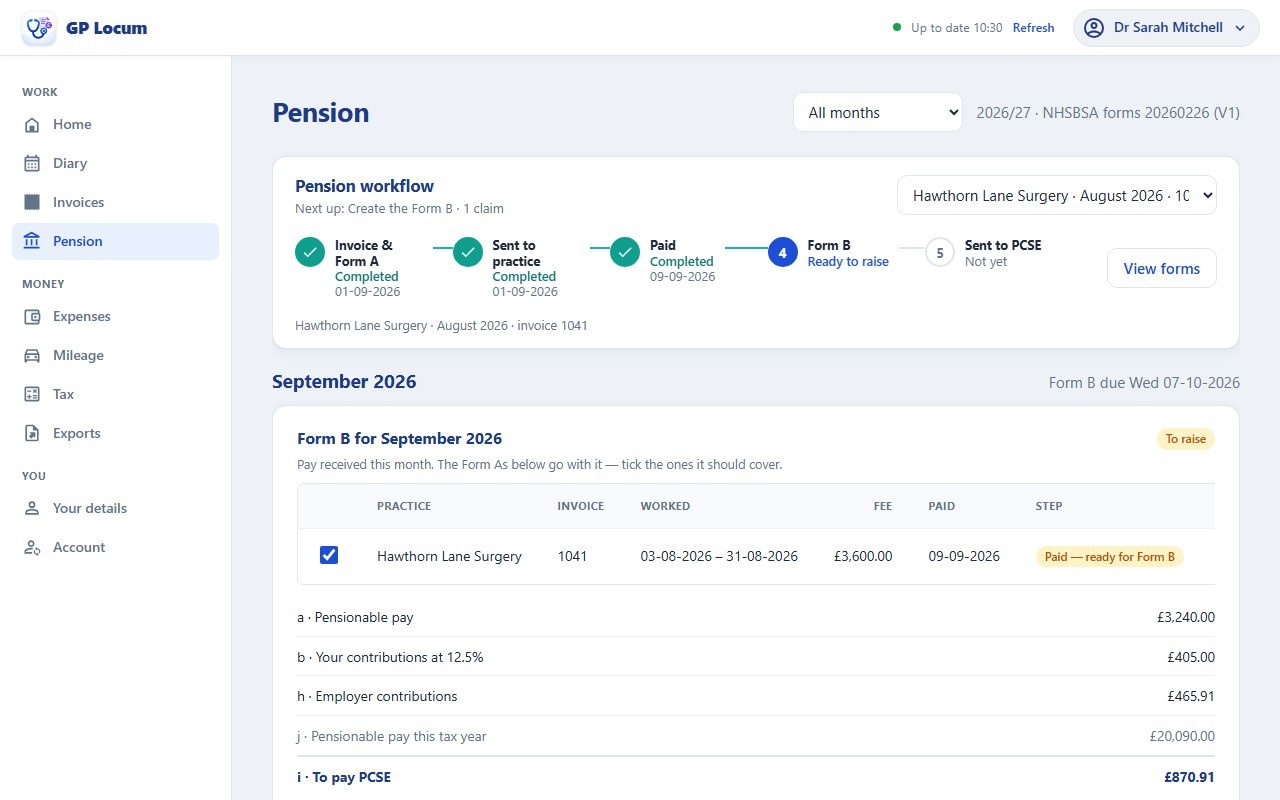
Form B is per month, and gathers up every Form A for that month: a totals the box 2s, b applies your tiered rate to that total, c to f carry added years, money-purchase AVCs, additional pension and ERRBO, g is your employee grand total, h totals the box 3s, i is g plus h (the amount you actually pay) and j is your cumulative pensionable income for the year to date.
Three mechanical details the tool handles that catch people out:
- Rounding is half-up at every declared box, not at the end. The figures are computed in whole pence rather than by multiplying decimals together, so what you submit matches what PCSE Online calculates rather than drifting a penny or two from it.
- Work spanning a month end has to be split. A booking running 29 June to 1 July is a June form for the 29th and 30th and a July form for the 1st. The tool splits it for you.
- Row limits are real. Form A takes 6 periods, plus 9 on Annex A, so 15 in total; Form B takes 9 rows before you need a continuation sheet.
A worked example
One Form A first. A fee of £700.00 gives pensionable pay of £630.00 in box 2, and an employer contribution of £90.59 in box 3, which is the figure that must also appear on your invoice to that practice.
Now a month with three of them, for fees of £700.00, £1,050.00, £1,400.00, declaring the 12.5% tier:
- a. Total pensionable pay £2,835.00
- b. Your contributions £354.38
- g. Employee grand total £354.38
- h. Employer grand total £407.67
- i, £762.05 to pay PCSE
Box b is worth a second look. £2,835.00 at 12.5% comes to exactly £354.375, half a penny, and the form takes it up to £354.38, not down to £354.37. That is the kind of penny that makes a reconciliation fail.
The payment needs a reference of the form 86039342LOCJUN2026. Your membership number, LOC, and the month and year worked. Without one that matches, the payment may never reach your record.
The tier rate is your declaration, not the tool's
This is the one box the tool will not decide for you, and the reason is that it cannot. Your tiered rate depends on all of your GP pensionable income (salaried posts, practice profits, other locum work), annualised across the days you were actually pensioned, and it stays provisional until the year ends.
Annualising means dividing your pensionable income by pensionable days and multiplying by 365, and for locum work it bites hard. £30,000.00 earned across 60 pensionable days annualises to £182,500.00, which sets the rate at 12.5%, the top band, where the headline £30,000.00 on its own would sit in the 8.3% band. Every gap between bookings, however short, reduces the days and pushes the rate up.
The tool shows you what your own figures imply so you can sanity-check the box, but the declared rate remains yours. The locum GP pension guide explains the mechanic and what to do if the rate you declared turns out to be wrong.
What it doesn't do
It prepares forms; it does not submit them, and it is not tax or pensions advice. Specifically:
- Nothing is sent anywhere. You download the PDFs and send them yourself, and the practice still has to sign each Form A. The 70-day clock runs from the last day worked, so a practice that is slow to sign is a real risk, not an administrative one, miss it and the work cannot be pensioned at all.
- It does not choose your tier rate, for the reasons above.
- England and Wales. The forms, the employing authority codes and the PCSE route are the England and Wales arrangements. Scotland and Northern Ireland administer their own schemes differently.
- Freelance locum work only. Salaried sessions, out-of-hours work under a different arrangement and work through a limited company are not pensioned this way. A salaried GP files a Type 2 form instead. See the Type 2 guide.
- The blank forms are dated. These are the 2026/27 forms. NHSBSA reissue them each April and the tiers can move with the pay award, so check you are on the current version before submitting.
- Your data lives in this browser only. That is the point, none of it is uploaded, but clearing site data loses it, so use the export as a backup.
Frequently asked questions
- What is the 10-week rule for locum pension forms?
- Form A has to reach NHS Pensions within 70 days, ten weeks, of the last day of the work it covers. Miss it and the work simply cannot be pensioned: the form is rejected and that period of membership is lost, with no discretion to accept it late. Because the practice has to sign the form first, the deadline is a reason to invoice and chase promptly rather than something to leave to the end of the month. Work ending 30/06/2026, for example, has to be submitted by 08/09/2026.
- How much of a GP locum fee is pensionable?
- 90% of it. The remaining 10% is treated as practice expenses and is not pensionable. This is fixed by regulation, so it applies whatever your actual expenses were, and you cannot elect to pension more or less. On a £700.00 fee, box 2 of Form A is £630.00.
- Is the employer contribution 14.38% of my locum fee?
- No. It is 14.38% of your pensionable pay, and your pensionable pay is only 90% of the fee. So as a share of the fee itself it comes to 12.94%. On a £700.00 fee that is £90.59, which is box 3 of Form A and the figure that should appear on your invoice. The 14.38% includes the 0.08% administration levy. The practice pays it to you and you forward it to PCSE with your own contribution.
- How is a locum GP's pension contribution tier worked out?
- By annualising: total GP pensionable income divided by the days you were actually pensioned, multiplied by 365, with the tier read off the annualised figure. This routinely lands locums in a higher band than their earnings suggest, £30,000.00 across 60 pensionable days annualises to £182,500.00 and attracts the top 12.5% rate, where that income alone would sit in the 8.3% band. Every break between bookings reduces the day count and raises the rate. The rate you declare on Form B is your own responsibility and stays provisional until the year end.
- What if a booking runs across the end of a month?
- It has to be recorded as two separate periods on two separate months' forms. A booking from 29 June to 1 July is a June form covering 29 and 30 June and a July form covering 1 July. NHS Pensions require this so that the correct contribution rate applies either side of any rate change and so annualisation attributes the days to the right months. This tool performs the split for you.
- What payment reference does PCSE need for locum contributions?
- Your membership number, then LOC, then the month and year the work was done, for example 86039342LOCJUN2026 for June 2026 work. This is the unique payment reference, and a payment that arrives without one matching the form may not be credited to your pension record, which is far harder to unpick afterwards than to get right first time.
Sources
Checked August 2026, against the 2026/27 forms. Rates and factors change. The primary source wins if it disagrees with anything here.
- NHS Pensions member hub - GP locum Forms A and B, NHSBSA, the blank forms, the 10-week rule and the employing authority codes
- GP pensions and locum forms, PCSE, where the forms and the payment go
- NHS Pension Scheme member contributions, NHS Employers, the tiered rates from 1 April 2026
- GP locum pension guidance, BMA, the 90% pensionable fraction and annualisation
Read the guide
Locum GP Pension Guide
Forms A and B, the 90% rule, the 10-week deadline, and the annualisation traps that cost locums pension.
Read guide →Locum Invoice Template and Generator
A free GP locum invoice template. Build and download a professional PDF invoice for a practice, with your bank details, session rates, and the optional NHS pension employer contribution line.
Open tool →Locum Tax Calculator
Work out what to set aside from your locum fees for tax and National Insurance.
Open tool →